Przejdź do treści

Sklepowy for Shopify

AI shopping assistant for your Shopify store

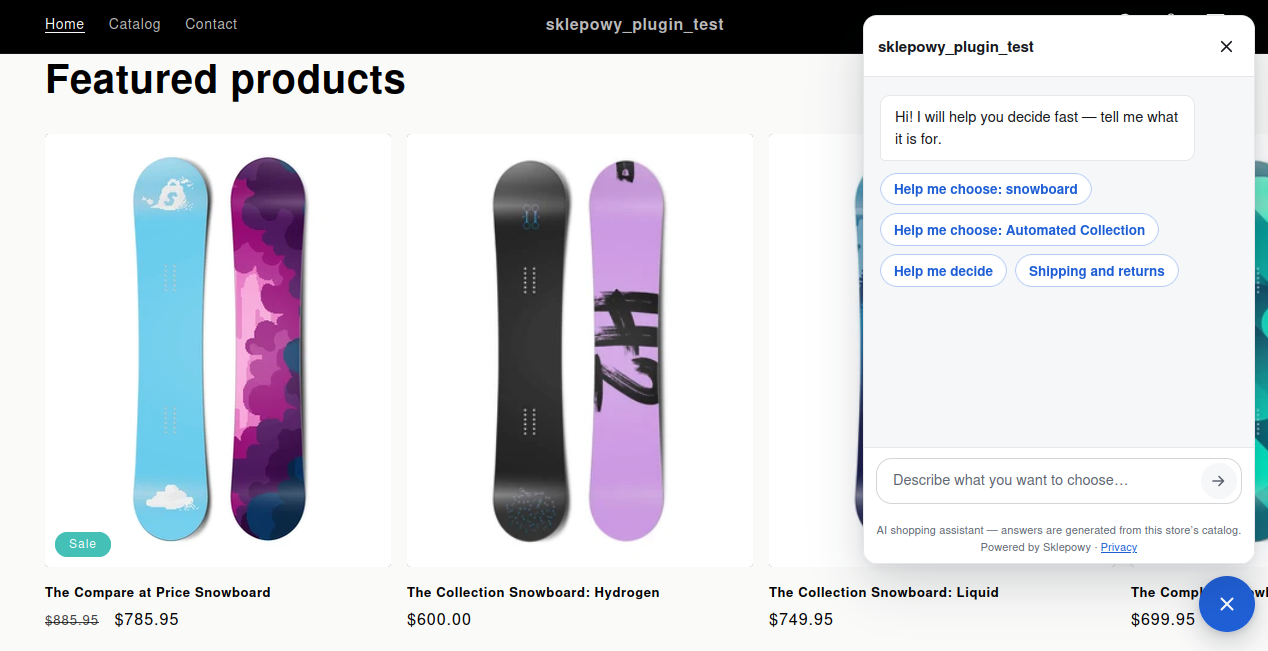
A shopper asks in the chat window. The assistant answers from your catalog and the pages you choose to share, and product cards show the live price and availability. Adding to cart runs through your Shopify store's own cart.
  • Free plan
  • No card
  • Built for Shopify
  • Read-only store access
The assistant in a Shopify store: the greeting and suggested questions.

A shopper who gets no answer goes to a competitor

In a store with hundreds of products it is hard to guess the exact name you are looking for. The shopper types a question into your store search, gets an empty list and leaves. Not because you do not sell it. Because they did not guess its name.

How to start

  1. 01

    Request an install link

    Sklepowy for Shopify is not in the Shopify App Store yet. Enter your store address in the form below and I will prepare an install link for your store and email it to you.

  2. 02

    Install the app

    Open the link and approve the install in your Shopify admin. The app connects your store to Sklepowy and starts the first catalog sync right away.

  3. 03

    Switch the assistant on

    On the Start tab, press “Enable on storefront”. The theme editor opens with the Sklepowy app embed switched on: just save the theme.

  4. 04

    The assistant answers your shoppers

    It only talks about products your store has. Every product card fetches the price and availability live from your store, and for variants the assistant asks about the options it still needs before adding to cart.

Request an install link

The link is prepared for one specific store, so I need its address. I reply with the link to the email you enter.

  • You will find the address ending in .myshopify.com in your Shopify admin: Settings → Domains.
  • Installing and the free plan cost nothing and need no card.
  • The app only asks for read access: products, inventory, pages, store policies and languages.

Ideally the address ending in .myshopify.com. You will find it in your Shopify admin: Settings → Domains.

What the app does

Sync without your effort

Product and inventory changes reach the assistant automatically through Shopify webhooks. Pages and store policies refresh periodically, and you can refresh them right away on the Pages tab.

Chosen pages and store policies

On the Pages tab you choose what the assistant may quote: shipping, returns, FAQ or terms. The store policies from your Shopify settings are available too.

A panel inside Shopify

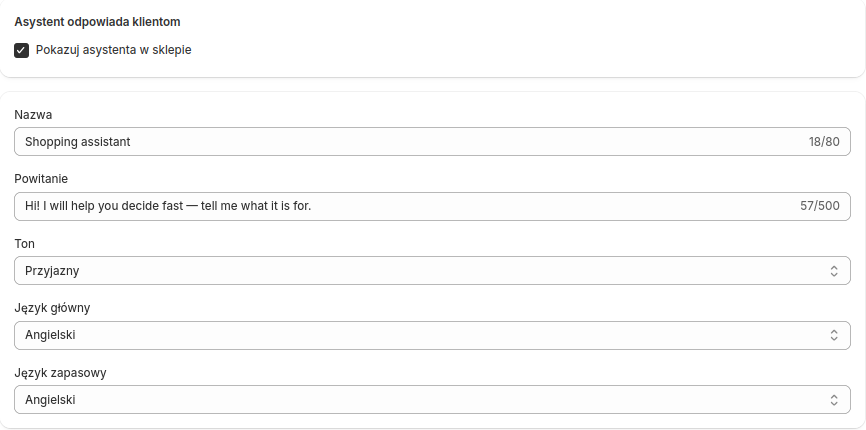
The Start, Assistant, Pages, Conversations and Billing tabs live in your Shopify admin. On the Assistant tab you set the look, greeting, tone and starter questions; on the Conversations tab you read what shoppers ask.
How it looks in Shopify

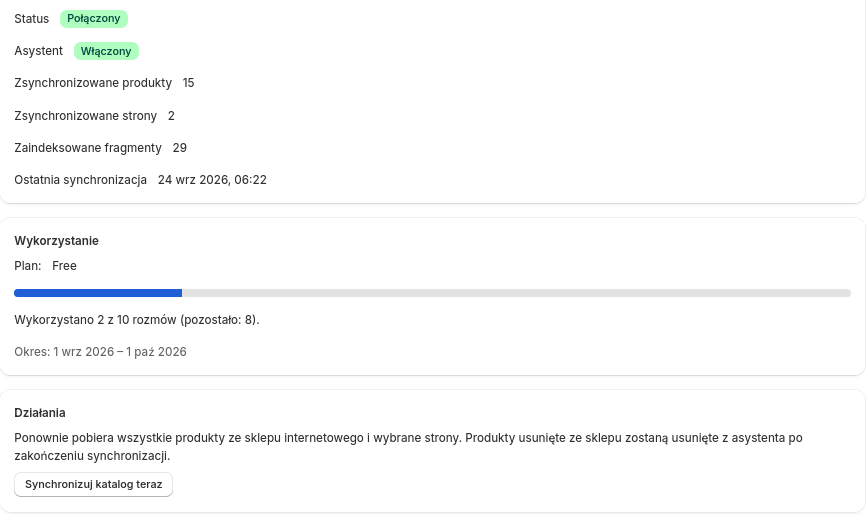
The Start tab in the Shopify admin: connection status, catalog sync and plan usage.
The Assistant tab: name, greeting, tone and answer languages.
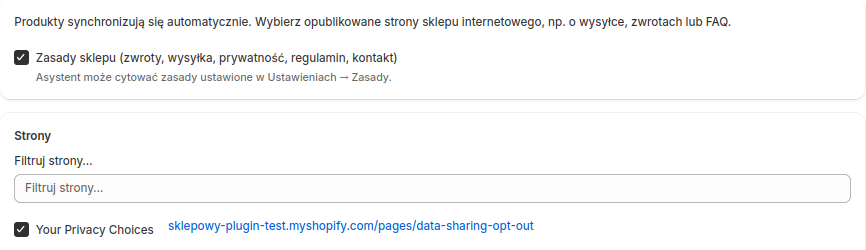
The Pages tab: store policies and the pages the assistant may quote.
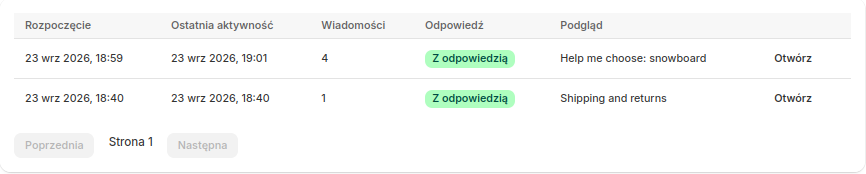
The Conversations tab: a list of shopper conversations with the assistant.

Safeguards built into the app

  • Shoppers see up front that they are talking to an AI shopping assistant that answers from your store's catalog.
  • Email addresses and phone numbers are stripped from messages before anything reaches the AI.
  • Order questions are answered from a fixed template, never by the AI: the assistant explains where the shopper can check the order status and shares your store's contact details.
  • The assistant does not invent products, prices, discounts, stock levels or store policies.

What the app never does

  • it does not place orders, issue refunds or take payments,
  • it has no access to orders or customer data: it only asks to read products, inventory, pages, store policies and languages,
  • it does not change anything in your shop: products, prices or stock levels,
  • it does not edit your theme code: the assistant is an app embed you switch on and off in the theme editor.

Plans

Start free

The free plan covers 10 conversations a month and needs no card and no account.

Paid plans

Starter, Plus and Pro raise the conversation limit. Each purchase is a one-off payment by card or BLIK for 30 days of access, with no subscription. Limits and prices are shown on the Billing tab in the Sklepowy panel.

How conversations are counted

A conversation counts the first time the assistant answers a shopper. Everything the shopper writes afterwards in that same chat is free.

Requirements: A Shopify store with an Online Store 2.0 theme (one that supports app embeds), such as Dawn or another current theme.

Common questions

Why a link instead of the Shopify App Store?
Sklepowy for Shopify is shared with each store separately, through an install link prepared for that store's address. That is why you request the link in the form and I email it back.
Where do I find my .myshopify.com address?
In your Shopify admin: Settings → Domains. Every store has one, including stores that use their own domain. If you enter your own domain, I will ask for it by email.
Do I need a card to start?
No. The free plan covers 10 conversations a month and needs no payment and no account.
Is my theme supported?
Yes, if it is an Online Store 2.0 theme that supports app embeds. Dawn and most current themes do. You switch the assistant on in the theme editor, with no code changes.
Does the assistant make up products or prices?
No. It only mentions products from your synced catalog, and every product card fetches the price and availability live from your store.
Can shoppers ask about their order?
Yes, but a fixed template answers, not the AI. The app has no access to orders: the assistant explains where the shopper can check the status and shares your store's contact details.
What happens when I uninstall the app?
Your store is disconnected from Sklepowy and the assistant disappears from your storefront. Data is removed in line with Shopify's privacy requirements.
What data reaches the AI model?
The shopper's question, the matching products and the conversation so far. Email addresses and phone numbers are stripped before a message reaches the AI, and shopper IP addresses are not stored. The privacy policy covers this in full.

Want to see the assistant in your store?

Leave your store address and the install link will arrive in your inbox. The free plan needs no card.